Executive Summary
A platform as high-stakes as the infrastructure it manages.
Kirke is the operations backbone for maintenance scheduling at national scale — coordinating field crews, network elements, maintenance windows, and outage communications across thousands of simultaneous activities. When it works, it's invisible. When it doesn't, field crews are dispatched to the same site, SLA penalties are triggered, and customers go dark without warning.
Over 9 months, I worked across three parallel tracks: fixing what was broken (13 inconsistent forms with errors that disappeared after 3 seconds), redesigning the core (transforming a single-page monolith into a guided, step-by-step scheduling flow), and building what was missing (16 new features, including a Multi-Day Maintenance dashboard for activities spanning multiple days and locations).
The redesigned platform reduced preventable scheduling conflicts by 40%, improved form completion rates by 40%, and cut plan creation time by 30%. A distributed engineering team across two time zones received a 180+ screen specification library that cut design QA cycles by a third.
Project Details
- Timeline
- Feb 2023 – Nov 2023 (9 months)
- Platform
- Enterprise Operations · B2B · Telecom
- Scope
- Error system redesign · Core workflow redesign · New feature delivery
- Role
- UX / UI Designer — discovery to engineering handoff
- Client
- Incedo Inc
Project Impact Overview
The Problem
"The system required tribal knowledge to operate — and nobody wanted to touch the forms."
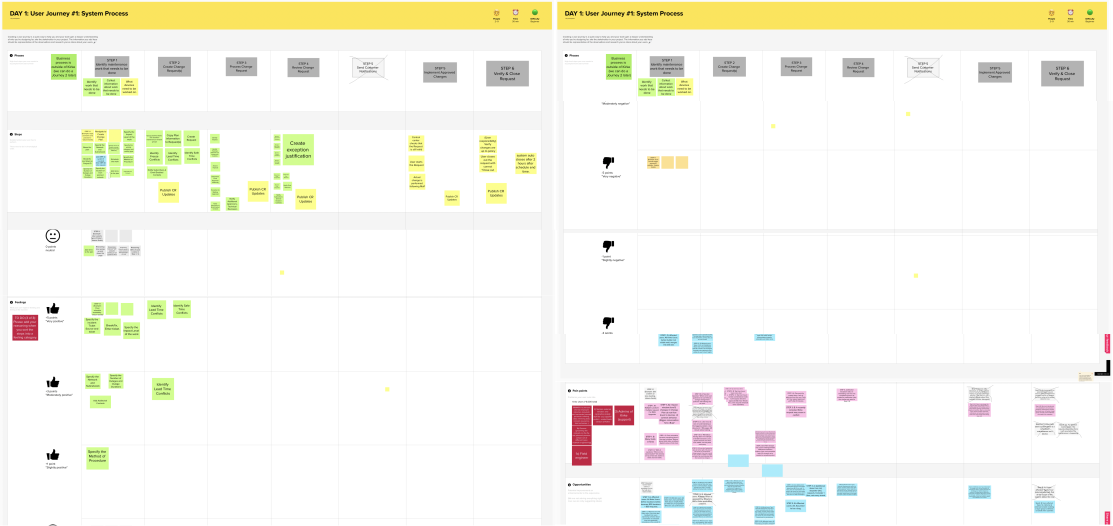
Synthesized from 19 user interviews and design workshop findings, Q1 2023.
Who it affected
Updating a schedule felt like defusing a bomb.
- Error messages vanished after 3 seconds — no recovery path, no actionable guidance.
- 13 forms with inconsistent validation: no mental model carried between them.
- Session timeouts on long forms lost all progress; users restarted from scratch.
We found out about conflicts after we drove to the site.
- Scheduling overlaps weren't surfaced during request creation — only discovered post-dispatch.
- Multi-day activities required separate requests per date, multiplying approval delays.
- Outage notifications arrived too late or not at all, triggering customer escalations.
The cost was measurable and preventable.
- Missed scheduling conflicts triggered SLA penalties — a direct, quantifiable cost.
- Fragmented multi-day maintenance approval chains delayed project starts.
- Customer escalations from poor outage communication generated persistent support overhead.
Track 01 · Optimising Existing Features
13 forms. 13 chances for a user to give up.
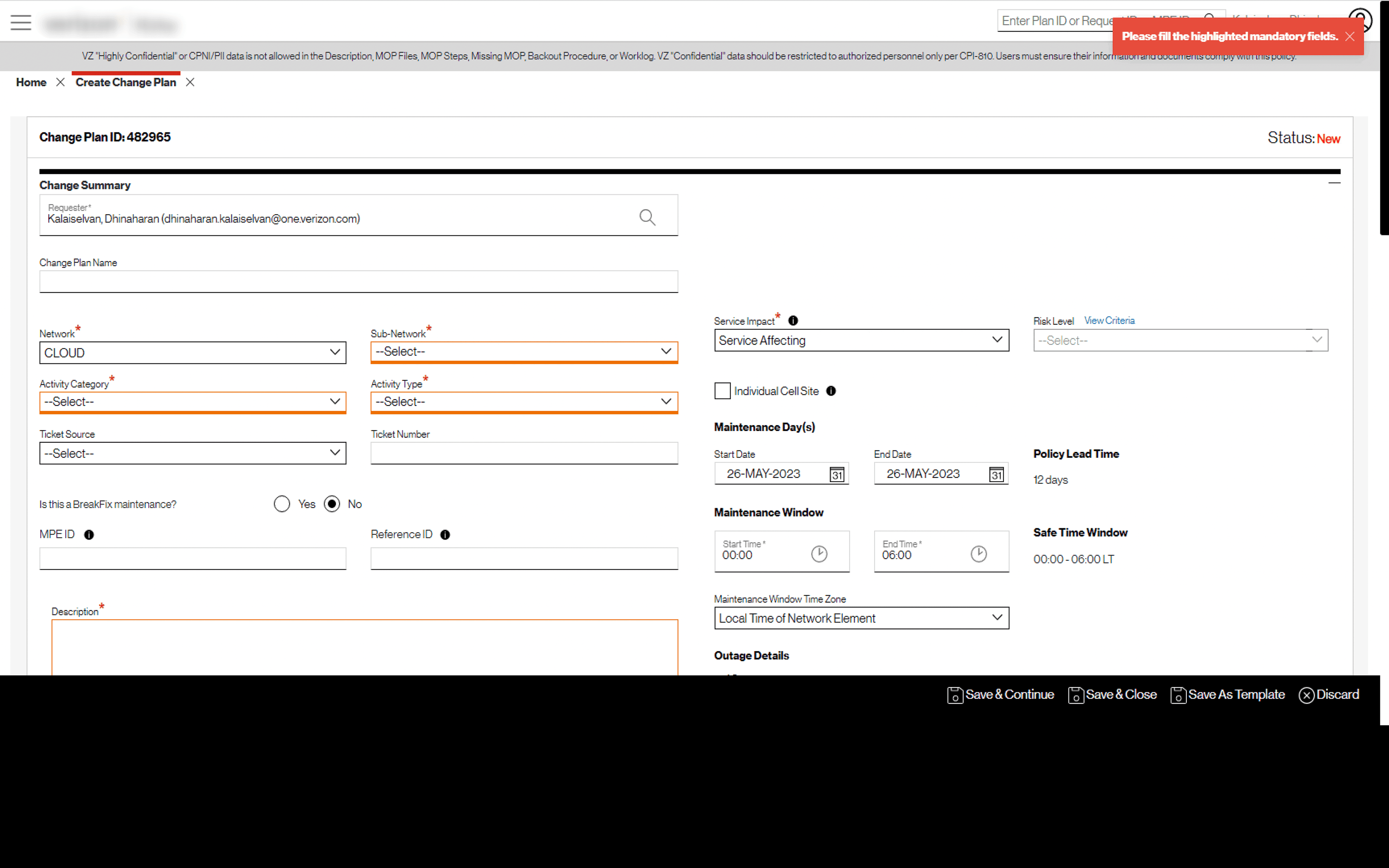
Kirke contained approximately 13 forms — from creating maintenance requests to managing network elements. Each had its own validation behaviour: some errors appeared only on hover, some surfaced a toast notification that disappeared after a few seconds, and none provided actionable recovery guidance. Users completing long, multi-step scheduling forms would encounter a problem, lose the error state, and abandon the form entirely.
Research approach
Method: Eisenhower Matrix prioritisation + competitive design pattern analysis
Scope: Validation patterns across 13 forms; error handling conventions from leading enterprise tools
← Before · Broken error model — 13 inconsistent forms
- 1Toast message: "Please fill the highlighted fields." — disappeared after 3 seconds
- 2Errors only visible on hover — invisible on touch devices and quick scanners
- 3No error categorisation — all failures looked and read the same
- 4No actionable recovery guidance — users couldn't tell what to fix or why
- 5Inconsistency across forms — no mental model carried between screens
The vanishing toast was the single highest-friction error pattern — users who missed it had no recovery path.
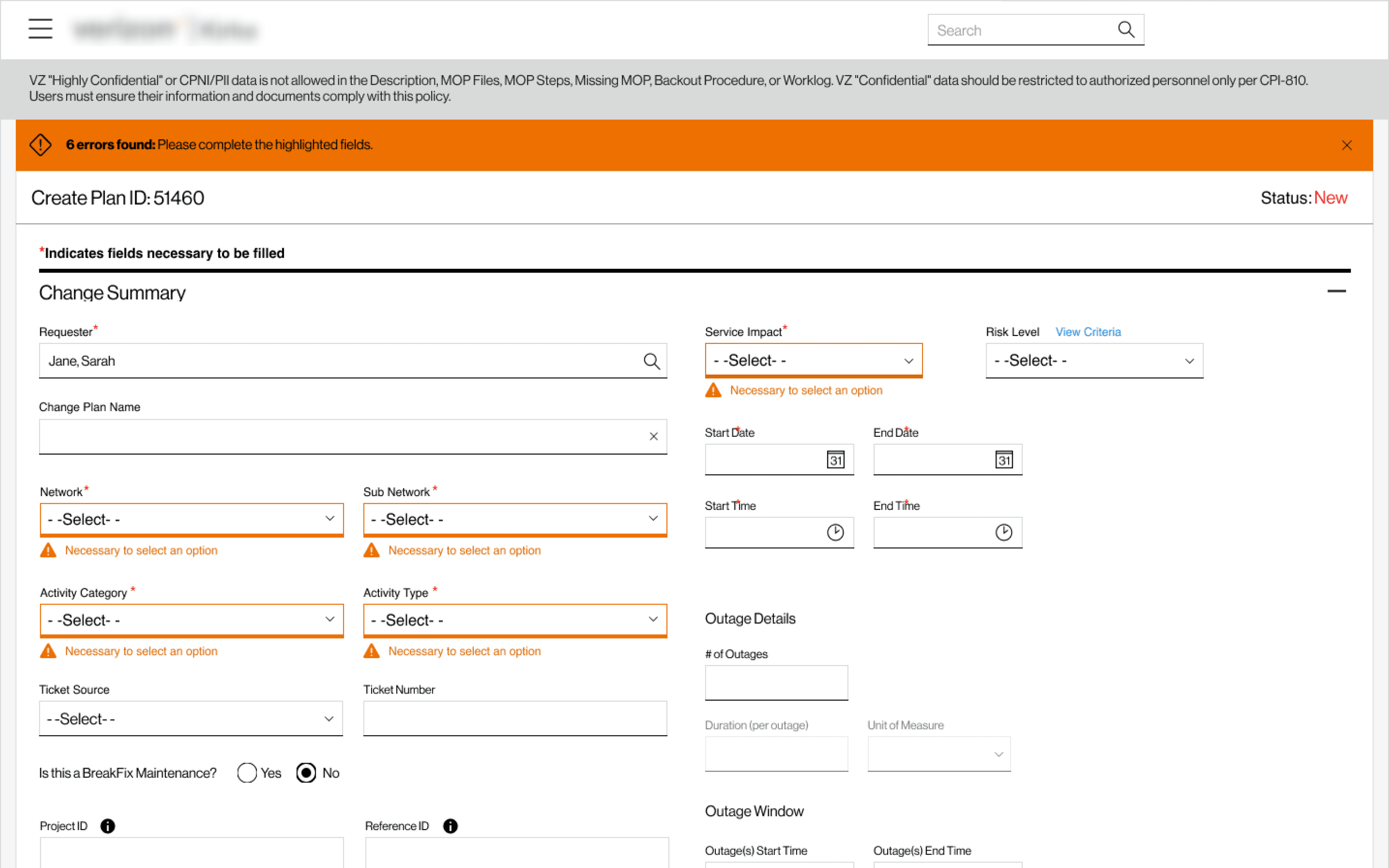
→ After · Standardised validation system
- 1Real-time inline validation as users complete each field
- 2Persistent, visible error states with colour coding and iconography
- 34 error categories: Validation, Input, Network, Access — targeted messages per type
- 4Tooltip guidance surfaced on complex fields before errors occur
- 5Consistent pattern across all 13 forms — one mental model throughout the platform
Error categorisation was the strategic win: it gave engineers a taxonomy and users language to describe problems.
20–30%
Faster error resolution post-launch
50%
Reduction in form abandonment
4
Error categories for targeted messaging
Track 02 · Redesigning Core Workflows
A maintenance request form shouldn't feel like a tax return.
The Create Plan and Request flows were the highest-frequency experiences on Kirke — touched by every user, multiple times a day. They were single-page layouts with all fields simultaneously visible, performance issues from multiple concurrent lookups, and a critical design flaw: the most important input (network element selection) appeared mid-form with no setup context. Long completion times regularly triggered session timeouts. Through 19 structured user interviews and journey mapping across 4 role types, the same theme emerged: users dreaded opening these forms.
Research approach
Method: 19 user interviews structured by role · User journey mapping · GUI heuristic evaluation
Scope: 10 Requesters · 4 Implementers · 1 Administrator · 4 Mixed-Role users
← Before · Monolithic form — all fields, all at once
- 1All fields visible simultaneously — no sense of progress or priority
- 2Heavy concurrent lookups caused slow load times and interaction lag
- 3Critical network element field buried mid-form with no setup context
- 4Long completion time increased session-timeout risk — progress lost on expiry
- 5No progress indicator — users couldn't gauge how far through they were
The session-timeout risk was the most cited frustration in interviews — users lost 20+ minutes of input with no warning.
→ After · Guided step-by-step flow
- 1Step-by-step flow modelled on e-commerce checkout — one focus area per step
- 2Asynchronous multipart loading — each step fetches only what it needs
- 3Critical inputs moved to step 1 with full context before dependent fields appear
- 4Persistent progress indicator throughout — users always know where they stand
- 5Smart defaults and 80/20 field prioritisation reduce decision fatigue
The e-commerce checkout mental model tested immediately in usability sessions — users described the new flow as "obvious."
85%
Of users found the new experience easier to navigate
40%
Task completion improvement post-launch
30%
Faster plan creation
Track 03 · Designing New Features
One job. Ten requests. Zero visibility.
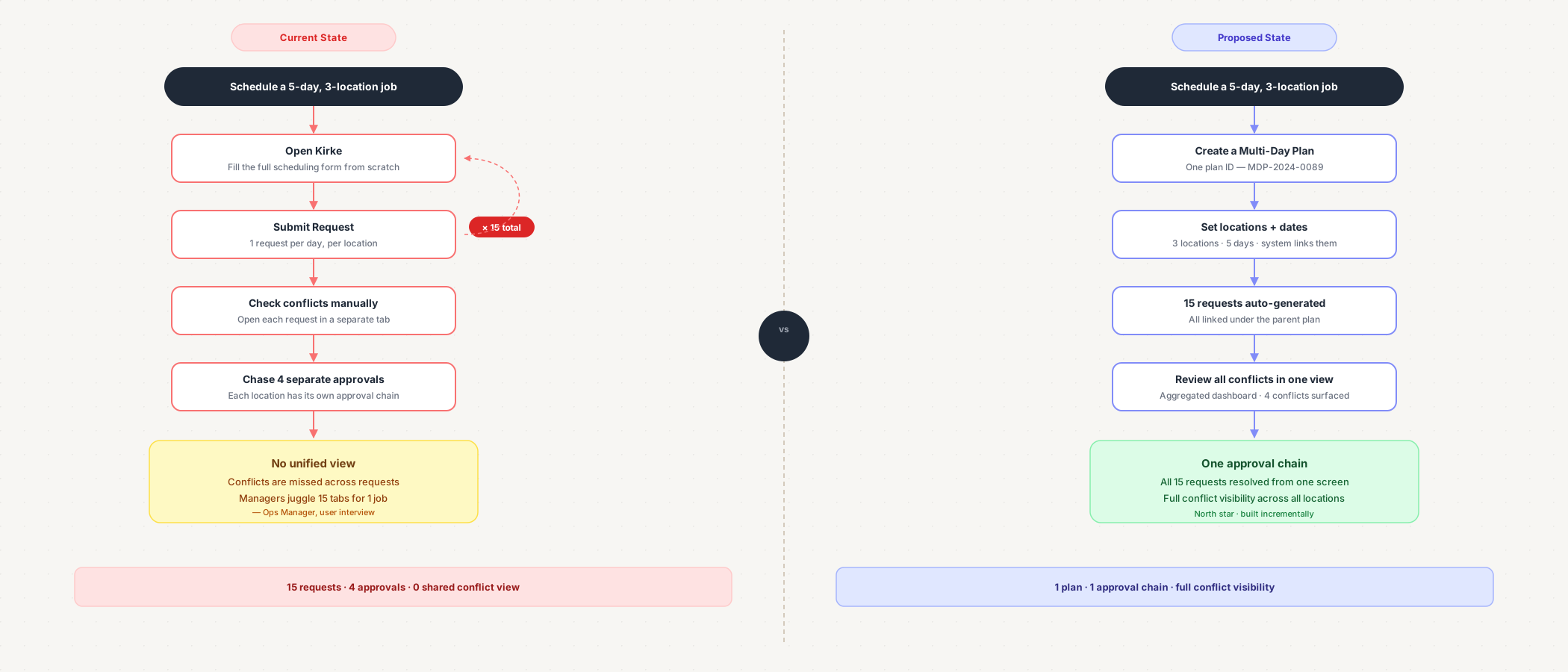
Multi-day maintenance activities — a crew working across multiple dates and locations on a single project — required a separate Kirke request for every date/location combination. A 5-day job across 3 locations meant 15 requests, 15 approval chains, and no aggregated view tying them together. Operations managers tracked complex jobs in spreadsheets alongside Kirke. Customer outage communication was equally fragmented. This was the most-cited improvement opportunity across stakeholder workshops.
Research approach
Method: Collaborative discovery workshops · Business requirements analysis · Technical feasibility scoping
Scope: Stakeholders · Business teams · Product Owners · Architects · Development team
Two models explored
Scenario A
Continuous
One request spanning multiple days. Simpler tracking, unified workflow. Best for activities with no inter-day dependencies.
Scenario B
Chunked
Separate requests linked by a parent Multi-Day Plan ID. Individual day-level tracking with full auditability. Best for complex activities requiring per-day sign-off.
← Before · Fragmented model — one request per date/location
- 1Each date/location combination generated a separate, unlinked request
- 2Multiple approval chains for a single job — delays multiplied with scale
- 3No aggregated view of a multi-day job — operators used external spreadsheets
- 4Fragmented outage notifications — customers received disconnected alerts
- 5Conflict detection was per-request, not across the full multi-day scope
Operations managers managing 5-day jobs tracked status across 15+ separate Kirke requests by memory.
◇ After · Proposed: Unified MDM Dashboard
- 1Centralised dashboard grouping all requests under a Multi-Day Plan ID
- 2Consolidated approval workflow — one chain for the entire activity
- 3Aggregated conflict detection across the full scheduling window
- 4Grouped outage notifications — customers receive one coherent communication
- 5Equipment schedule view and export for custom reporting
Labelled "Proposed" intentionally — the design shipped incrementally, not as a single dashboard release.
Honest outcome
The dashboard was positively received by product and business stakeholders. Backend architecture then introduced a hard constraint: MDM had to be split into smaller development stories for incremental delivery. The dashboard was parked temporarily — not cancelled — while constituent pieces were built. The design became the north star for incremental delivery rather than a single-release artefact.
16
New features designed and delivered in total
8
Stakeholder workshops run across the engagement
2
Multi-day scheduling scenarios designed end-to-end
Reflection
High-stakes systems teach you to design for what goes wrong.
Failure modes are the product.
On most platforms, the happy path is 90% of design effort. On Kirke, the most valuable work happened in edge cases — what happens when an error vanishes before a user reads it, when two crews are dispatched to the same site, when a multi-day job has no single tracking view. Investing in failure modes is what produced the 40% conflict reduction.
Research credibility unlocks design authority.
The Eisenhower Matrix prioritisation and 19-interview programme weren't just research activities — they were the mechanism that gave design a seat at the roadmap table. Stakeholders trusted design decisions because they could trace them directly to user evidence. Evidence earns influence.
Technical constraints are a design input, not an obstacle.
The MDM dashboard pivot from a unified release to incremental delivery wasn't a failure. It was a product design decision. Adapting the delivery strategy while preserving the design vision — and communicating that distinction clearly to stakeholders — is what kept the north star intact for future sprints.
Craft & Delivery
180+
Screens delivered with shared interaction patterns
8
Stakeholder workshops facilitated
16
New features designed end-to-end
2 TZs
Engineering team served via interaction specification library